
模拟其他部分
主页 > 前端 > javascript >
来源:自学PHP网 时间:2021-01-04 10:18 作者:小飞侠 阅读:次
[导读] JavaScript实现页面高亮操作提示和蒙板...
|
今天带来JavaScript实现页面高亮操作提示和蒙板教程详解
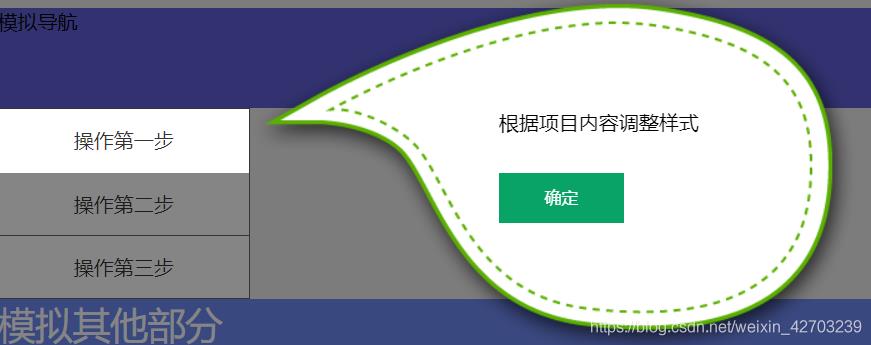
本文实例为大家分享了JavaScript实现页面高亮操作提示和蒙板的具体代码,供大家参考,具体内容如下 在页面上,有时候会遇到操作提示,如下图所示。
需要说明的是,被高亮的部分,并不是目标的真实标签,而是用的其他标签模拟的。 标签高亮的部分和操作提示框,都是用 js 动态生成的。 这里关键的知识点: 1、要用 JS 获取目标标签的位置。 el.getBoundingClientRect() 可以获得标签距离窗口的位置。 2、要能动态生成提示标签和遮罩层(一般是半透明的黑色) 3、还要用到 CSS 中的定位。 为了更直接的模拟真实情况,我采用了一些标签来模拟页面的结构。 HTML 代码如下:
基本样式如下:
.posa{
 position: absolute;
}
.header{
 height: 200px;
 width: 1200px;
 margin-left: auto;
 margin-right: auto;
 background: #eee;
}
.mainNav{
 height: 80px;
 width: 1200px;
 margin-left: auto;
 margin-right: auto;
 background: #5f5fd7;
}
.pageMain{
 width: 1200px;
 margin-left: auto;
 margin-right: auto;
 background: #eee;
}
.sidebar{
 width: 200px;
 line-height: 50px;
 text-align: center;
 background: #fff;
 border:1px #666 solid;
 border-bottom:none;
}
.sidebar a{
 display: block;
 border-bottom:1px #666 solid;
 color: #333;
}

.other{
 height: 700px;
 background: #708af5;
 font-size: 30px;
 color: #fff;
}

.mask{
 position: fixed;
 top:0;
 right:0;
 bottom: 0;
 left:0;
 background: rgba(0, 0, 0, 0.48);
}

.tips{
 background: #fff;
 position: absolute;
 line-height: 50px;
 color: #333;
 display: block;
 text-align: center;
}

.tipsc_content{
 margin-left: 200px;
 padding-top: 100px;
 margin-right: 80px;
}
.tipsc_btn{
 padding-top: 30px;
}

.tipsc_btn button{
 outline:none;
 width: 100px;
 height: 40px;
 background: #09a366;
 color: #fff;
 border:none;
 cursor: pointer;
}
JavaScript 代码如下:
// 获取目标标签
let step1 = document.getElementById("step1");
let body = document.getElementsByTagName("body")[0];
let tips = null,
mask = null,
tipsContent= null;
// 创建标签。默认生成 mask 标签
let makeElement = function({id="mask",classN="mask",content = ""}={}){
let eId = document.getElementById(id);
if( !eId ){ // 判断 mask 是否存在
eId = document.createElement("div");
eId.id = id;
eId.className =classN;
eId.innerHTML = content;
body.appendChild( eId );
return eId ;
}else{
return eId; // mask 已经存在,不需要再创建。
}
};
// 去掉遮罩层
let removeTag = function(tag){
tag.parentNode.removeChild( tag );
};
// 获取要提示的内容的位置。这里是 li#step1
let getPostion = function(tag){
let x = tag.getBoundingClientRect().x ;
let y = tag.getBoundingClientRect().y ;
return {x:x,y:y};
};
// 设置tips的位置
let setPosition = function(tips, {x="0",y="0",w="0",h="0"}={}){
tips.style.left = x + "px" ;
tips.style.top = y+ "px" ;
tips.style.width = w+ "px"
tips.style.height = h + "px"
console.info(tagP.x , tagP.y );
};
// 获取要提示的内容的标签位置
let tagP = getPostion(step1);
// 生成 mask
mask = makeElement();
// 生成目标标签的高亮框
tips = makeElement({
id:"tips",
classN:"tips",
content :"操作第一步" // 伪装原标签的内容
});
setPosition(tips, {
x:tagP.x + window.pageXOffset,
y:tagP.y + window.pageYOffset,
w:step1.offsetWidth ,
h:step1.offsetHeight
});
// 生成提示内容框
tipsContent = makeElement({
id:"tipsContent",
classN:"tipsContent posa",
content :`
简单进行了下函数封装,但是还是觉得代码写的不够完美。比如用JS生成了样式,其实可以把一些样式封装在CSS 中。 以上就是本文的全部内容,希望对大家的学习有所帮助,也希望大家多多支持自学php网。 以上就是关于JavaScript实现页面高亮操作提示和蒙板全部内容,感谢大家支持自学php网。 |
自学PHP网专注网站建设学习,PHP程序学习,平面设计学习,以及操作系统学习
京ICP备14009008号-1@版权所有www.zixuephp.com
网站声明:本站所有视频,教程都由网友上传,站长收集和分享给大家学习使用,如由牵扯版权问题请联系站长邮箱904561283@qq.com