来源:自学PHP网 时间:2019-08-07 16:33 作者:小飞侠 阅读:次
[导读] 使用python实现简单五子棋游戏...
|
用python实现五子棋简单人机模式的练习过程,供大家参考,具体内容如下 第一次写博客,我尽力把它写好。 最近在初学python,今天就用自己的一些粗浅理解,来记录一下这几天的python简单人机五子棋游戏的练习,下面是实现过程的理解(是在cmd中运行的): 主要流程: *重点内容* - 首先是模块及类的划分 模块及类的划分 类的划分涉及到了面向对象的内容,根据五子棋游戏的设定,人和机器依次在一个棋盘里下棋,一方五子连线为赢,初步分为棋子类、棋盘类和策略类,每个类单独放一个模块,加上main模块一共四个模块。
棋子类和棋盘类 棋子类比较简单,在棋子的角度,只要接收位置和颜色(阵营),传出位置和颜色(阵营)即可,其中位置用元组打包传递 class Chessman(object): #初始化 def __init__(self): pass def set_pos(self,pos): self.pos = pos def get_pos(self): return self.pos def set_color(self,color): self.color = color def get_color(self): return self.color 棋盘类需要用到棋子类,在这之前,先要进行棋盘的设定 #类属性 board_size =15 #初始化棋盘 def __init__(self): self.__board = [[0 for i in range(0,Chessboard.board_size+1)] for j in range(0,Chessboard.board_size+1)] 清空棋盘类似 #清空棋盘,‘+'为棋盘的样子 def init_board(self): #忽略第0行 for i in range(1,Chessboard.board_size+1): for j in range(1,Chessboard.board_size+1): self.__board[i][j] = '+' 打印也差不多,注意在坐标轴旁放上序列号,这里纵坐标为1-15,横坐标为a-o
# 打印棋盘
 def print_board(self):
 #打印列号
 print(' ', end='')
 for i in range(1,Chessboard.board_size+1):
  c = chr(ord('a') + i-1) # ord 字母转ASCLL码
  print(c,end='')
 print()
 #棋盘
 for i in range(1,Chessboard.board_size+1):
  if 1<= i <=9:
  print(' ', end='')
  print(i, end='')
  for j in range(1,Chessboard.board_size+1):
  print(self.__board[i][j], end='')
  print()
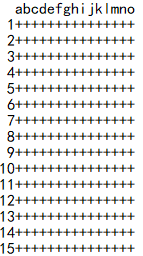
效果为如下
接下来是棋子的放入: 这个可分为两个方法,一个根据传入的位置放置传入的颜色;另一个接收一个棋子类的实例对象,获取该实例的位置和颜色,调用第一个方法并传入数值,一定要注意在传参的时候验证
#写入对应位置的颜色
 def set_chess(self,pos, color):
 if not isinstance(pos,tuple):
  raise RuntimeError('第一个参数必须为元组')
 if pos[0] <= 0 or pos[0] > Chessboard.board_size:
  raise RuntimeError('行下标越界')
 if pos[1] <=0 or pos[1] > Chessboard.board_size:
  raise RuntimeError('纵下标越界')
 self.__board[pos[0]][pos[1]] = color

 #把棋子对象摆放到棋盘上
 def set_chessman(self,chessman):
 if not isinstance(chessman, Chessman):
  raise RuntimeError('类型不对,第一个参数应为ChessMan对象')
 pos = chessman.get_pos()
 color = chessman.get_color()
 self.set_chess(pos,color)
接下来的根据棋盘位置获取棋子颜色的方法主要是为了策略类的判定输赢准备的
#根据棋盘位置获取棋子的颜色
 def get_chess(self,pos):
 if pos[0] <= 0 or pos[0] > Chessboard.board_size:
  raise RuntimeError('行下标越界')
 if pos[1] <=0 or pos[1] > Chessboard.board_size:
  raise RuntimeError('纵下标越界')
 return self.__board[pos[0]][pos[1]]
策略类 策略类要用到前面两类,有更多名称的方法或属性的要用,所以要更仔细一点搞清楚哪个是哪个 #初始化要把棋盘对象传入 def __init__(self,chessboard): self.__chessboard = chessboard 人下棋:策略类负责把人输入的东西字符串变成x,y坐标,写入棋子对象
def parse_user_input(self,input,chessman):
 if not isinstance(chessman,Chessman):
  raise RuntimeError('类型不对,第一个参数必须为Chessman对象')

 ret = input.split(',')
 value1 = ret[0]
 value2 = ret[1]
 #转换成坐标
 pos_x = int(value1)
 pos_y = ord(value2) - ord('a') +1
 chessman.set_pos((pos_x, pos_y))
 #print(ret)
机器下棋:这里具体策略暂用随机数代替了(有空在想,略过略过~)
#电脑下棋的策略
 def computer_go(self, chessman):
 if not isinstance(chessman,Chessman):
  raise RuntimeError('类型不对,第一个参数必须为Chessman对象')
 while True:

  # pos_x和pos_y在1~15之间随机生成一个数
  pos_x = math.ceil(random.random()*Chessboard.board_size)
  pos_y = random.randint(1,15)
  #判断是否为空,否则重新生成坐标
  if self.__chessboard.get_chess((pos_x,pos_y)) == '+':
  print('电脑下棋的位置:%d,%d'%(pos_x,pos_y))
  chessman.set_pos((pos_x,pos_y))
  break
判断当前棋局的胜负:每一方下棋都要判断一次,因此可根据当前下的一子的范围来判断是否在上下左右和两斜排有连续五子,如果有则胜利。 斜排主要是x,y的判断范围比较难定,其他的差不多。以下是本宝宝绞尽脑汁想到的判断方法(特别是斜排的),检查到目前是没有问题的,或许还有更好的方法: #判断胜负 #当摆放一个棋子,判断是否赢 def is_won(self,pos,color): #垂直方向的范围 start_x = 1 end_x = 15 if pos[0] -4 >=1: start_x =pos[0] - 4 if pos[0] +4 <=15: end_x = pos[0]+4 #垂直方向的判断 count = 0 for pos_x in range(start_x, end_x+1): if self.__chessboard.get_chess((pos_x, pos[1])) == color: count +=1 if count >=5: return True else: # 一旦断开 统计数清0 count = 0 #水平方向的范围 start_y = 1 end_y = 15 if pos[1] -4 >=1: start_y =pos[1] - 4 if pos[1] +4 <=15: end_y = pos[1]+4 #水平方向的判断 count = 0 for pos_y in range(start_y, end_y+1): if self.__chessboard.get_chess((pos[0], pos_y)) == color: count +=1 if count >=5: return True else: # 一旦断开 统计数清0 count = 0 #左上右下方向判断 count = 0 s=pos[0] - pos[1] start=start_x end=end_y+s if pos[0]>pos[1]: start=start_y+s end=end_x for index in range(start, end+1): if self.__chessboard.get_chess((index, index-s)) == color: count +=1 if count >=5: return True else: # 一旦断开 统计数清0 count = 0 #左下右上方向判断 count = 0 s=pos[0] + pos[1] if pos[0]+pos[1]<=16: start=start_x end=s-start_y if pos[0]+pos[1]>16: start=s-start_y end=start_x if s>=6 and s<=12: for index in range(start, end+1): if self.__chessboard.get_chess((index, s-index)) == color: count +=1 if count >=5: return True else: # 一旦断开 统计数清0 count = 0 return False 接下来再用一个判断胜利方的方法调用上面的策略
#判断对象放置后,胜负是否已分
 def is_wonman(self,chessman):
 if not isinstance(chessman,Chessman):
  raise RuntimeError('类型不对,第一个参数必须为Chessman对象')
 pos = chessman.get_pos()
 color = chessman.get_color()
 #调用is_won()获取它的返回值
 return self.is_won(pos,color)
main模块 main模块用来对整个游戏的玩法格局进行控制。
def main():
 chessboard =Chessboard()
 chessboard.init_board()
 chessboard.print_board()
 engine = Engine(chessboard)
 count=0
 select = int(input('用户选择先后:(先:1,后:2)'))
 #先
 while True:
 chessman = Chessman()
 chessman.set_color('x')
 if select==1:
  i = input('人下棋,请输入下棋坐标(格式:x,y):')
  engine.parse_user_input(i, chessman)#转换成坐标
 else:
  #电脑下棋
  print('电脑下棋:')
  engine.computer_go(chessman)
 # 把该棋子对象放到棋盘上
 chessboard.set_chessman(chessman)
 count +=1
 #打印棋盘
 chessboard.print_board()
 if engine.is_wonman(chessman):
  if select==1:
  print('人赢了!')

  else:
  print('电脑赢了!')
  break
 if count == 225:
  print('平局!')
  break


 #后
 chessman = Chessman()
 chessman.set_color('o')
 if k==1:
  #电脑下棋
  print('电脑下棋:')
  #电脑给棋子生成策略(位置)
  engine.computer_go(chessman)
 else:
  i = input('人下棋,请输入下棋坐标(格式:x,y):')
  engine.parse_user_input(i, chessman)#转换成坐标
 #下棋
 chessboard.set_chessman(chessman)
 count +=1
 chessboard.print_board()
 if engine.is_wonman(chessman):
  if k==1:
  print('电脑赢了!')
  else:
  print('人赢了!')
  break
 if count == 225:
  print('平局!')
  break
主线程作为程序入口操控每个棋局:
if __name__ == '__main__':
 while True:
 print('开始一局!')
 #调用main方法
 main()
 s=int(input('是否再来一局:(是:1,否:0)'))
 if s!=1:
  break
 print('游戏结束!')
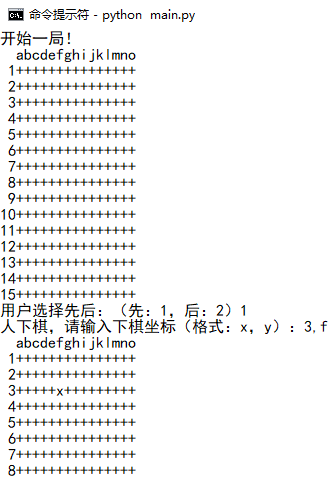
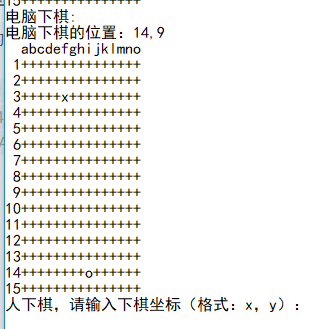
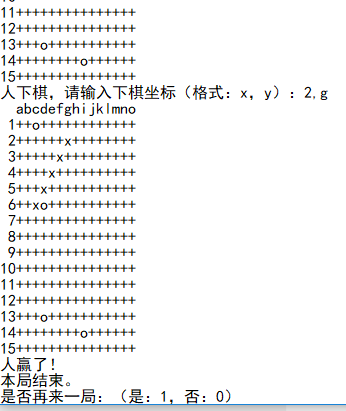
五子棋的简单人机模式就是综上所述的了,不过这个代码中输入的地方没加检查,所以坐标输入一定要是数字加逗号加字母的格式才行,可以加正则表达式进行判断。放上效果图:
以上就是本文的全部内容,希望对大家的学习有所帮助,也希望大家多多支持自学php网。 |
自学PHP网专注网站建设学习,PHP程序学习,平面设计学习,以及操作系统学习
京ICP备14009008号-1@版权所有www.zixuephp.com
网站声明:本站所有视频,教程都由网友上传,站长收集和分享给大家学习使用,如由牵扯版权问题请联系站长邮箱904561283@qq.com