来源:自学PHP网 时间:2019-08-07 16:02 作者:小飞侠 阅读:次
[导读] python实现二级登陆菜单及安装过程...
|
python实现二级登陆菜单的代码如下所示: """
1.三级菜单 注册 登陆 注销
2.进入每一个一级菜单,都会有下一级的菜单
"""
user_item = dict()
try:
while True:
print('-------Welcome sir-------')
input_choice = int(input('Please enter your choice:1:Registration 2:login 3:logout:'))
# 用户输入自己的选择,会进入到相关的二级菜单
if input_choice == 1:
# if input_choice==1 进入注册
user = input('Please enter your account number:')
pwd = input('please enter your password:')
# 保存用户注册的账号
user_item['user'] = user
user_item['pwd'] = pwd
# 提示用户注册成功
print('您的账号已生效,下次请用该账号:{}登陆本系统'.format(user))
# if input_choice==2 进入登陆
elif input_choice == 2:
login_user = input('Please enter your login account number:')
login_pwd = input('please enter your login password:')
# 对用户输入的账号和密码进行确认
if login_user == user_item['user'] and login_pwd == user_item['pwd']:
print('Welcome sir:{}'.format(login_user))
else:
print('Sorry, your account or password is incorrect. Please confirm and come back')
# if input_choice == 3 进入注销
elif input_choice == 3:
logout_input = input('Do you really want to quit this system?,y or n')
if logout_input == 'y':
break
elif logout_input == 'n':
input_choice = int(input('Please enter your choice:1:Registration 2:login 3:logout:'))
else:
print('Your input is incorrect')
except Exception as re:
print(re)
finally:
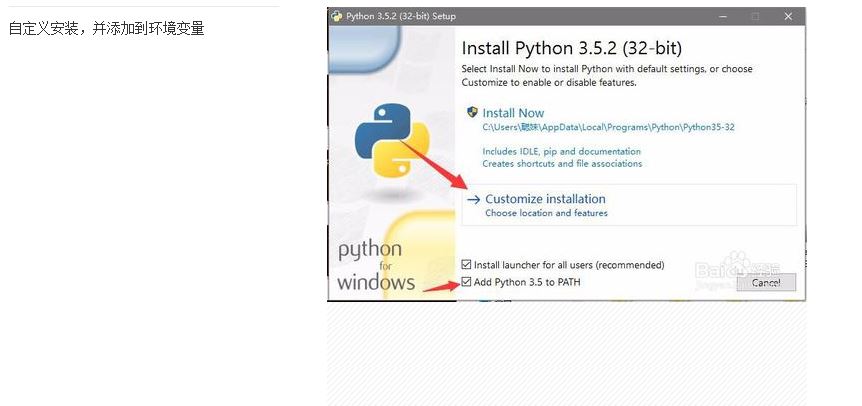
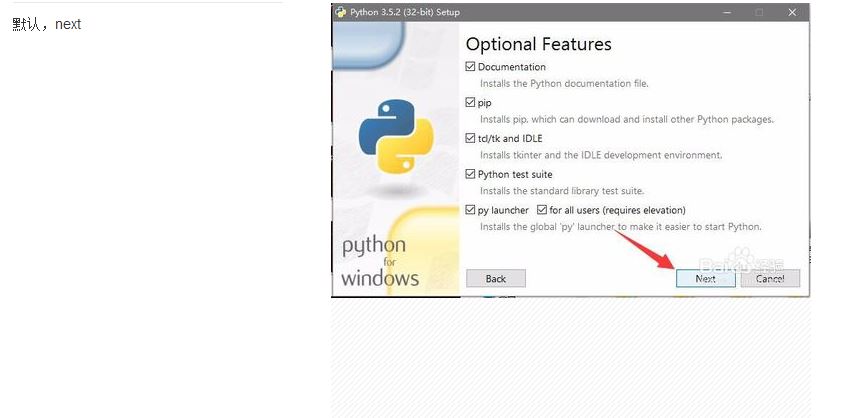
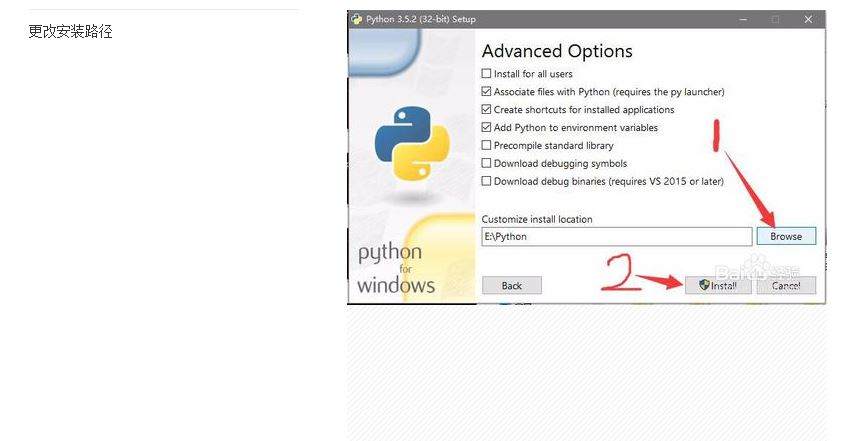
print('')下面看下python 安装过程。 Python安装 Windows: 1.下载地址: 2.百度云盘分享地址: 链接:https://pan.baidu.com/s/1FJ0fXs6mIBm342AJ4ZXNhw 3.安装过程(自动添加安装路径):
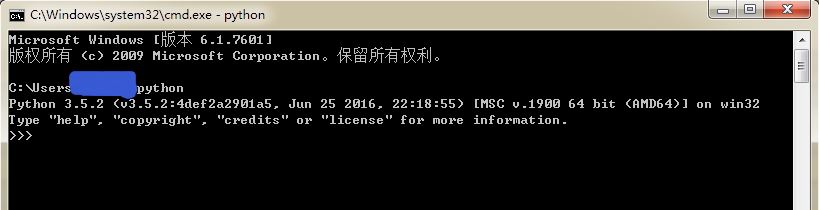
4.手工添加路径: a.【右键计算机】-->【属性】-->【高级系统设置】-->【高级】-->【环境变量】: 5.查看是否安装成功: Windows下,开始(快捷键:Windows+R)-cmd,输入命令:python
总结 以上所述是小编给大家介绍的python实现二级登陆菜单及安装过程,希望对大家有所帮助,如果大家有任何疑问请给我留言,小编会及时回复大家的。在此也非常感谢大家对自学php网网站的支持! |
自学PHP网专注网站建设学习,PHP程序学习,平面设计学习,以及操作系统学习
京ICP备14009008号-1@版权所有www.zixuephp.com
网站声明:本站所有视频,教程都由网友上传,站长收集和分享给大家学习使用,如由牵扯版权问题请联系站长邮箱904561283@qq.com